
If you are upgrading an existing Darwin1 customer to Darwin2 we suggest to leave Darwin1 on the PC and install Darwin2 on the same machine.
You can run both versions of Darwin in parallel on the same machine. However Darwin1 and Darwin2 can not share the same database. So if you want to move Darwin1 recordings to a Darwin2 database you will have to do that via DAW-files (export from Darwin1 to DAW and import those files into Darwin2). However, we recommend to leave Darwin1 on the computer. If a customer then wants to look into an old recording, he can simply open Darwin1 to do so.
Old configuration: Darwin2 has undergone a lot of functional changes. Unfortunately it's not possible to re-use screen layouts or reports that have been created in Darwin1. Also the DConnect-configuration has to be re-done (see below)
ATTENTION: When you import a DAW file that was created with Darwin1 into Darwin2 the results of the beat analysis and the arrhythmia analysis are NOT imported. To get beat annotations you will need to re-analyze the recording. (Reason for that is that the changes in the beat analysis structure were so big, an importing routine would have been an enormous effort).
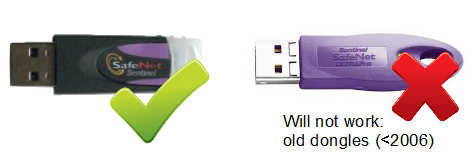
Using old dongles: Darwin2 will work with Darwin1 dongles, unless they are VERY old (older than 2006). Old dongles are purple or blue and have a rather round shape where newer dongles are black and have a square shape. When you installed Darwin2 on a machine you can run the tool named "DongleTest.exe" that is installed in the Darwin2 program folder to check if your dongle is new enough to support Darwin2. If the dongle is too old please contact Switzerland for a dongle exchange. You can exchange the old dongle against a SoftLicense for a small handling fee.
Known issues:
64bit Firebird driver: If you install Darwin2 on a 64bit Windows, then also the 64bit driver version of the Firebird database driver will be installed. Unfortunately Darwin1 can't work with that version. To fix that please uninstall all installed firebird drivers and install the 32bit firebird driver version (on the Darwin2 installation CD, folder "Supplements", file "02_Firebird-2.5.???_Win32.exe"). From Darwin2.1 on the installation routine automatically forces installation of the 32bit driver if Darwin1 is detected on the system.
Darwin1 license server: To use Darwin1 and Darwin2 in parallel, Darwin1 will need to be at least in version 1.12 so it uses the license server.
Upgrading DConnect (HL7-connectivity): Switching to the new Darwin2 DConnect service is unfortunately not that straightforward. From the old folder where Darwin1 is installed collect the following files and mail them to us: DConnect_custom.ini, Tpl_*.txt, HL7*.txt
We will tell you how to set up the new system to behave like the old one.