
- Details
- Written by: medilog
- Category: Marketing info
- Hits: 3777
Darwin 2 is available in 4 Editions:
- Enterprise
- Professional
- Office
- Basic
Darwin Basic
Recommended for BR102plus and medilog AR12plus HRV
- License free version
- See database & PDF reports
- Start recording (cards/blue tooth) incl. worklist
- Recording import (Observer)
- Recording Export
- ABPM (MT-300 successor)
- HRV including fire-of-life for single channel recordings made with medilog AR12plus HRV
Darwin Office
MT-200 successor recommended for private practices with medilog FD5plus
- Template editing
- Create reports
- Print queue
- QT
- ST
- PM
- HRV time-domain
- Beat meter
- Full disclosure
- Movement analysis
Darwin Professional
Recommended for clinics with medilog AR4plus
- All Office features
- Atrial analysis
- ECHOView
- Fire-of-life HRV frequency domain
- Advanced template editing with superimposition
Darwin Enterprise
Recommended for scanning centers, university hospitals with medilog AR12plus or medilog FD12plus
- All Professional features
- EDR episodes
- SpO2
- Liberty Scanlab
See Darwin2 Editions.pdf , Darwin2 Feature matrix.pdf and Recorder editions
- Details
- Written by: medilog
- Category: Marketing info
- Hits: 2521
First of all: everything! :-)
For the moment we’ll focus on the main features. This documentation will continue to grow. We’ll try to add info to it at least once a week.
Go and install Darwin 2 on a machine (it will run in parallel with a Darwin 1 installation) and play around a bit. That’s the best way to get to know it. And if you run into problems simply write an email. Our ultimate goal is to have a piece of software that doesn’t need manuals. Please help us by mailing your questions.
However: Here's a short list of some changes in Darwin2 you should know about:
- License-free import: the observer now doesn't require a license anymore. This makes setting up a multi-workstation system even easier.
- License-free Darwin Edition: You can now run Darwin even without any dongle. It will start in the "Basic Edition" mode, allowing working with blood pressure recordings and recordings made with HRV-recorders (1 ECG channel) or checking reports that have been saved with a recording. This also makes DarwinUL obsolete.
- Improved screen layout handling: There's no more need to especially configure Darwin for different screen resolutions. Darwin now is a "normale" Windows application that scales it's module windows dynamically as you resize the main window.
- Printing: Users can generate custom reports in seconds by combining predefined report sections
- Undo: You deleted an arrhythmia by accident. Or mis-classified a beat? No drama. Click Undo.
- Automatic archiving: Recordings nobody has looked at for a long time can be archived (or deleted) automatically. This way the users server will not run out of space.
- SpO2-functionality: We now support AR12Plus recordings that contain SpO2 data
- Recorder-hookup via bluetooth: You can configure our recorders using a bluetooth connection and check signal quality on the PC screen
- Superimposition-Splitting helps you to break up templates where template mixing occured
- Print queue: A power tool for including interesting information you see into the final report
- Cursor history: Never again loose track of where you just have been
- Intelligent delete: Auto-purge recordings that have been marked as deleted for some time
- Multi-day recordings with varying sleep times: You can define sleep times wherever you like. On different times each day.
- AFib/AFL classification is now possible in EchoView, FullDisclosure and Tachogram
- Reanalysis-wizard warns you when your exclusions make a reanalysis a good idea
- Per-User workflows: No matter on which computer you log on, you'll always have your personal settings & workflows
- Easier installation: All settings are now stored in the database. Setting up a new workstation takes less than a minute.
- Configuration without Registry-fiddling: You don't need to know where which setting can be found. There's a central place for everything including explanation. Fool-proof. You don't need it. But still - it's there :)
- Restore to defaults: A users has configured a system to death? The default settings are just one mouse-click away
- Clearer ECG through anti-aliased display
- Authentication: Added support for LDAP and Windows Single-Sign-On
just to name a few. And here's a list of the most popular pages
- Details
- Written by: medilog
- Category: Marketing info
- Hits: 2717
What is a screen layout?
Module windows are typically docked into the main application window of Darwin2. A (meaningful) composition of modules can be stored and is called a "screen layout". A "workflow" is a list of screen layouts wich a user typically goes through during his work on a recording. E.g. during a normal work, the user would first look at the "Patient demographics" layout which contains the demographics, some short information on the recording and the patient diary. After the user verified that this information is correct, he could proceed to the "Trend" screen layout where he sees a heart rate trend and some overview information about found arrhythmias.
Customizing layouts
Click on the workflow title underneath the database icon. In the popup menu select "Design mode". Change the layout as desired. When you are ready, click on "Save layout" in the same menu. You changed the layout for the current user. To make your workflows the standard workflows for all users, click "Manage workflows". A window pops up that allows you to configure workflows. Click on "Defaults" / "Save as system default". Now the workflow will be applied for all users that don't have personalized workflows yet.
For a short demo-video see http://www.screencast.com/t/3Ws1HW22
Btw: You can revoke a user's permission to edit layouts in the AdminTool. (Users / Customize group / "Customize screen layouts")
Layout and workflow requirements
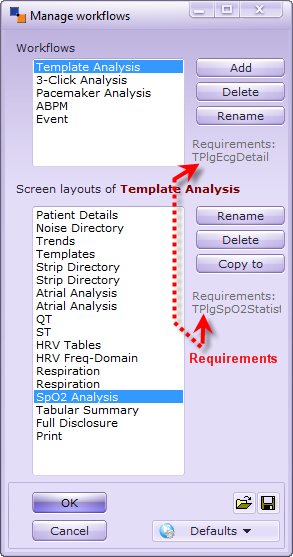
When you select a workflow in the "manage morkflows" window, a list with all contained layouts is displayed. You may see multiple entries with the same title here. When you click on such an entry, you will see all requirements of the selected entry. A requirement limits the visibility of an element. So if you opened a recording that does not contain respiration information, it does not make sense to show workflows and layouts that require respiration information. When you click on the entry "SpO2 Analysis" you see that the requirement "TPlgSpO2Statistics", which means that this layout is only visible when the SpO2-statistics-plugin is available.
You can change the requirements by right clicking on a entry and selecting "Configure visibility".