
To minimize the amount of work needed to translate new versions of Darwin we use a translation dictionary that contains all phrases, workflows and reports used in the software.
To translate such a dictionary you need to install the program "Translator" and open the dictionary file (e.g. by doubleclicking the twl-file).
This is what you see:
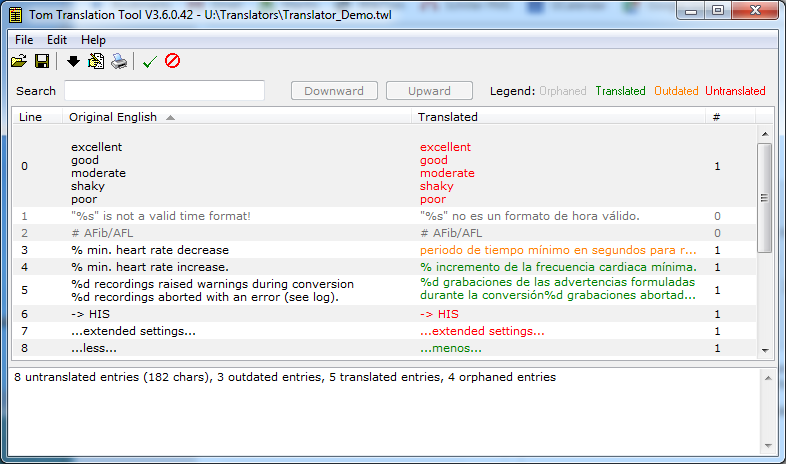
The first column holds the original English text, the second column holds the entries in "your" language the the 3rd column specifies how often this word/sentence is used in the software.
The entries are color coded to show their state. You'll see:
- green: entries that are already translated
- red: entries that are not yet translated at all
- orange: entries that have been translated in the past, but the original English string has been modified. A re-translation might be necessary.
- gray: entries that are not used anymore. These entries are just kept for future reference and no translation is necessary.
Translate items by overwriting the content of the 2nd column. To edit a cell simply start typing or press <Enter>. To finish editing press <CTRL> + <ENTER> (Pressing only <ENTER> will not work if you are editing a multi-line-entry). When you change an entry it will turn green marking the entry as translated.
If you see an entry that is red or orange and you think that the translation is already correct press CTRL+T (or select "Set translated" from the context menu) to mark it green.
Placeholders are special characters (%s, %d ...) that will be replaced with values during program execution (e.g. "You have deleted %d files."). The translator also has to maintain that in the translation the placeholders are ordered in the same sequence. If the sequence is not maintained, the program will issue a warning. Theoretically it is possible to change the order of placeholders, but this procedure is quite complicated and therefore not explained here.
For items where the context is not clear, you'll find a additional explanation in the lower area of the translation tool. If you still don't know how to translate a word, you have to mark the line as "untranslatable" by pressing <CTRL>+U. We will give you feedback on those items, so you know how to translate them in a 2nd run.
Updating translations
If you want to make changes to translations in Darwin, you have to do those changes on a new dictionary file. Just send me an email, you'll get the new language file within a very short period of time.
Some of you keep old (outdated) dictionary files, apply changes there and send these files to me. This is BAD! We will refuse to accept outdated language files, as using such language files may cause troubles (e.g. some translations that have been made earlier may be overwritten and lost).
If you want to make changes to translations please FIRST request a new updated dictionary file from me, change it and send it back.