
It may happen that you open a recording and find that big parts of the recording are excluded even though the signal quality is fine in those areas.
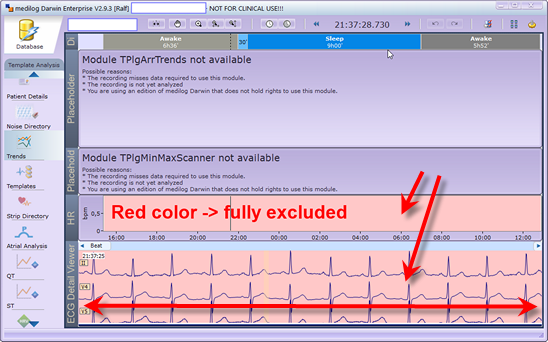
The reason for that is - in most cases - bad contact of an electrode. The medilog recorders measure the electrode impedance. High impedance typically comes from a badly connected electrode, but can also be greasy or hairy skin, or simply very bad electrode quality.
If the impedance of an electrode connection is too high, a "lost electrode" information is stored with the affected ECG signal. Darwin reads this information and excludes the affected sections of ECG.
Switch to the "Noise directory" screen of Darwin. Switch to the "Automatically excluded" display. Here you see all excluded sections as strips. Each strip states the reason for the exclusion in the lower left corner.
"Lead off" means that the recorder reported a bad electrode conduction.
Worst case is that the driven right leg electrode went off, this would exclude all channels.
To get rid of these exclusions, you can do one of the following:
- In the noise directory select all "Lead off" exclusions (or press CTRL+A to select all strips). Then press the "delete" key.
- In the ECG Detail viewer module, fold out the left menu. Right-click on the first analyzed ECG channel, eg ECG[1]. Select "Remove all exclusions". You are asked if you want to reanalyze. Click "No". Repeat for channel 2 and 3. Reanalyze the recording.
After that you need to reanalyze the recording for the newly available ECG sections to be inspected. Typically this is done automatically.
If the problem re-occurs with this recorder, it might be a problem on the electronics board of the recorder and the recorder might require maintenance.
(Mantis 4647)