
It might happen, that a recording is assigned to the wrong patient and you can't simply change the patients demographics, either because the patient is assigned to more than one recording or the patient was created from a his and is read-only.
Here's a guide on how to resolve that:
1.) Make sure that the new patient exists in the Darwin database. If it doesn't then start the RecorderConfig and configure a recording with the new demographics, or create one by sending a new request from the HIS to Darwin.
2.) The Darwin user has to have the right to access the "maintenance" menu entries. So when the database browser is open, you should see the Maintenance button in the top right corner.
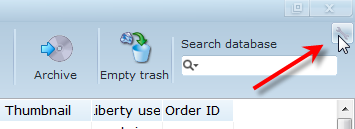
If the button is not there, open the admin tool, go to the users section, select your user, click on the "Customize" button and set the "Maintenance" checkbox.
3.) In the database browser right click the recording that is assigned to the wrong patient. Select "assign patient" from the context menu. Select the new patient from the displayed list.
4.) Clean up. If you created a new patient using RecConfig, then delete the entry from the "recordings in progress" list. And you can disable the "Maintenance" right for your user again if you like.