
In this module a diagnosis can be written, either manually or also using predefined summary text templates.
Select a summary template in the right hand column and click the arrow icon to add it to the summary.
Creating custom template
A summary can also be created according to the user’s requirements. To do so, write the desired text, right click into the list of templates on the right and select "Add template".
Modify existing template
To modify an existing template do as follows:
- Click "New" to clear the text field
- Click on a template once, so it is marked blue
- Hold down the CTRL key and click the "<" button
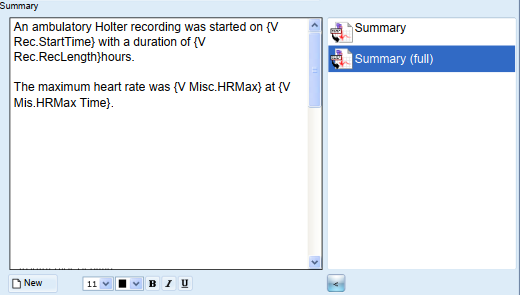
- The template is displayed in the text field, raw, untranslated and the SmartFields are not filled in (see image below)
- Modify the text according to your needs (add/delete text and SmartFields)
- A list of possible SmartFields can be found in "Reporting information.pdf" in the installation CD. For more info read Report customization
- Right-click the template in the list on the right
- select "overwrite template"
Template visibility
After the template is listed on the right side, you can define for which type of recorders this template is available. Right-click on the template-name and select "Define visibility". Now select data channels or analysis modules that must or may not be available for the selected summary.
E.g. if you select "ECG[1]" as required channel, then this summary will not be visible for blood pressure recordings.